Installing Arnold Single License Server Model flexnetserver Systemon an Apple Mac OS Render Farm.

As of version 5.0.1 Arnold requires that the license server is using the Autodesk flexnetserver system instead of the RLM system previously used by Arnold.

I have just switched the render farm over to this system and had some trouble getting all the required information I needed in one place as many instructions have a certain amount of assumed knowledge.

So here is various instructions gathered from different parts of the Autodesk support site and placed in ONE list, with a few comments and additions here and there from myself.

1. Download the installer

https://knowledge.autodesk.com/support/maya/downloads/caas/downloads/content/autodesk-network-license-manager-for-mac-os-x.html

This will be installed on the server computer.

You will need to be on Apple macOS High Sierra 10.13, Apple macOS Sierra 10.12 or Apple Mac OS X El Capitan 10.11.


2. Reveal the hidden folders and documents in your Finder

You will need to do this to be able to see some of these folders where the installation is taken place.

  1. Open Terminal found in Finder > Applications > Utilities.
  2. In Terminal, paste the following: defaults write com.apple.finder AppleShowAllFiles YES.
  3. Press return.
  4. Hold the ‘Option/alt’ key, then right click on the Finder icon in the dock and click Relaunch.


3. Obtain a license from Autodesk

You can do this by logging into your account on Autodesk.com and going to “Manage Products and Downloads” and selecting “Generate A Network License File”from the Arnold drop down menu.

It’ll ask for the MAC address and name of your machine.

You can get the MAC address by going to System Preferences, click on NETWORK, choose WIFI from the list of connections, then click on Advanced and then select Hardware.

The MAC Address is displayed here.


4. Install the flexnetserver software on your server

In Finder, go to the Downloads folder and double-click nlm11.14.1.3_ipv4_ipv6_mac_universal.tar.gz

In Finder, double click nlm11.14.1.3_ipv4_ipv6_mac_universal.pkg to run the installer

Copy your license file to /usr/local/flexnetserver

I had trouble with this as my admin did not have permission to look inside the “usr” folder.

So, post intsallation, I moved the flexnetserver folder onto the root of my Hard Drive. Consequently I had to adjust all subsequent addresses from  /usr/local/flexnetserver to /flexnetserver.


5. Start the Server

Open a terminal

Start the license server. Copy this line of text and paste it into the terminal window. Then press ENTER

/usr/local/flexnetserver/lmgrd -c /usr/local/flexnetserver

(in my case Where the first address is the location of the flexnetserver file and the second is the location of the license file.)

This is the command that run to start the license server after you restart the computer.


6. Test the Status

Type this into a terminal window.

/usr/local/flexnetserver/lmutil lmstat -a -c /var/flexlm/adsk_server.lic

Where the first address is your flexnetserver adress (see above) and the second is the location of your license file.


7. Convert any text files you make into PlainText

In TextEditor go to “format” and select Make Plain Text.


8. Set up the Server so that it automatically restarts.

  • Copy the contents below and save the file on the Desktop and call it: profile.txt
/usr/local/flexnetserver/lmgrd –c /usr/local/flexnetserver/adsk_server.lic  –l /var/flexlm/adsk_server.log
(Note: the above command assumes that your Autodesk software license file name is adsk_server.lic and is located in /var/flexlm/ folder.  If your license file name and location is different, please adjust the command accordingly.  The same assumption is made regarding debut log file, /var/flexlm/adsk_server.log.)
  • Open a Terminal and type: 
cd $HOME
  • Type the following and the file will be moved from your Desktop to your HOME directory and renamed:
mv Desktop/profile.txt .profile
  • Type the following and confirm that there is a .profile file in the folder:
ls -la
  • Go to System Preferences > Users & Groups.
  • Select your user and finally Login Items.
  • Click the + symbol on the bottom. In the dialog window, click on the search bar on top-right and type “Terminal“. Double click on the correspondent result. Eventually, Terminal will be added in the Login Items list as shown below:
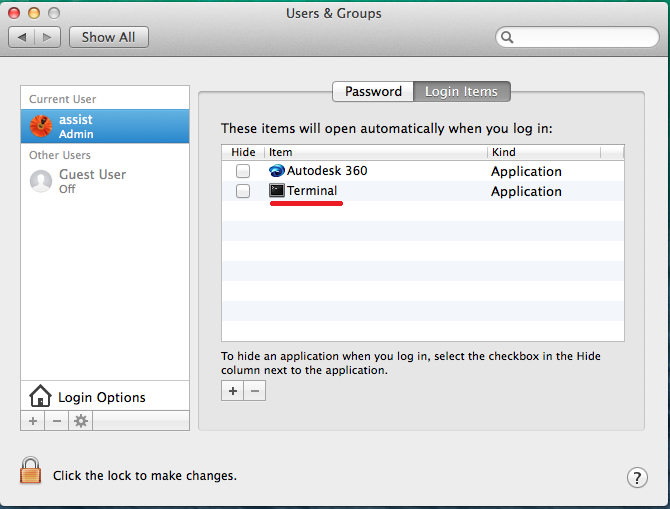
  User-added image
  • Reboot your computer and if this shows up in the Terminal, it’s working.  You can also open the Activity Monitor (View > All Processes) and confirm that the adskflex and lmgrd are running.
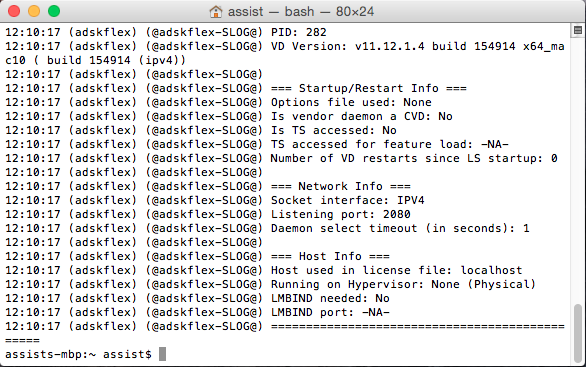
​ User-added image

9. Creating the Environment Variable for the Client Machines.

Make sure that you correctly set the  ADSKFLEX_LICENSE_FILE variable:

An Environment Variable is needed for Arnold to verify where to pull a license from. This needs to be done on the workstation where MtoA will run.

Use a text editor to create a flexlmrc.txt file. Its content should look like this, except with the name or IP address of your license server:

ADSKFLEX_LICENSE_FILE=@MY_SERVER_HOSTNAME_OR_IP


If the license server is on the same machine as Arnold, 
your flexlmrc file will look like this:
ADSKFLEX_LICENSE_FILE=@localhost

Save the txt file anywhere on your machine. Open a Terminal window and type open ~ (Mac) or nautilus ~ (Linux) to open your Home folder, then drag and drop your flexlmrc.txt file there.
Then type  cd ~ to move your terminal to the Home folder.
Finally type mv flexlmrc.txt .flexlmrc (Mac) or mv flexlmrc .flexlmrc (Linux) to make the file a configuration file.

This file can now be copied to the Home folder of the other machines in your farm.


That’s it. Run a simple test and check for watermarks.

Silos and the Open Web

On Blogs, RSS and Social Media:

The Open Web movement asserts a special role for public, cooperative, and standard World Wide Web communications; it opposes private, exclusive, proprietary Web solutions.

Computer scientist Tantek Çelik gives three aspects of the Open Web:

  1. publish content and applications on the web in open standards
  2. code and implement the web standards depend on
  3. access and use content / code / web-apps / implementations

Wiki


An information silo, or a group of such silos, is an insular management system in which one information system or subsystem is incapable of reciprocal operation with others that are, or should be, related. Thus information is not adequately shared but rather remains sequestered within each system or subsystem, figuratively trapped within a container like grain is trapped within a silo: there may be a lot of it, and it may be stacked quite high and freely available within those limits, but it has no effect outside those limits.

Wiki


Sometimes I wonder what it’d be like to go full-bore blog again, like in the old days. Twitter’s only real use is as a notification system, after all, so you’d just pump out post links to it from your blog. You know, the way people used to, when having a place for your own voice and your own thoughts was a good thing.

When I was in the swing of it, way back when, it was like the world’s most minimalist radio station. A Station Ident post to start the day, a Night Music or Closedown post at the end of the day, littered with whatever strangeness and wonder passed my screen in between.

I miss that long moment when the web seemed full of people doing the same thing, or thinking in public. It happens in the Republic Of Newsletters, now. But it was nice to have all those little radio stations broadcasting in the night.

Warren Ellis


The above tweeter, RSS pioneer, David Winer has made an RSS feed for journalists. Eliot Landrum has followed suit with an RSS feed for Open Architects.  These are in the form of OPML files that can be read in your RSS reader of choice.

High Sierra 10.13.2 move/copy files finder freeze issue

There appears to be a compatibility issue between the High Sierra 10.13.2 security update and Samba (SMB), the networking protocol. I believe this is an issue to do with Intel processors, but that is as far as my understanding goes.

As a result, moving files on an externally mounted drive on an internal network causes the finder to freeze, (with the message “preparing to copy…”) requiring a manual shutdown to get the computer going again.

We have found a work around as follows:

  1. Eject the drive/computer from the machine where the freeze is happening, using the eject icon in the finder window.
  2. Go to Finder > Go > Connect to server…
  3. Into the server address type afp://xxxx, where xxx is the internal ip address of the server where the drives are located.
  4. Follow your normal connection procedure from here.

This reconnects the drive using the AFP protocol. So far we have been able to have full control over our folders on the externally mounted drive on the internal network. At this point we’re not sure if this requires reconnecting each time you start up, but it would be advisable to turn of any auto load of the drives in the “login items” in your User Preferences.


“AEGP Plugin MayaImport: Error reading Maya file. ( 5027 :: 12 )”

One of the splendours of using After Effects and Maya together is being able to import cameras from one to the other.

I use this feature a lot and then the issue came with a scene I just working on. I tried many different things and eventually realised it was the scene that was triggering the problem. I wondered if it had picked up a glitch that AE didn’t like.

So my fix was, To make a new fresh scene, import the previously exported camera (the one AE refused) then to export it again from there. Then it worked.

EDIT: Ensure that the correct resolution is set in the render settings and the camera focal length also matches the original camera.

10 Reasons Why Animators Should Make GIFs

1. They’re quick to do. 
Animation is traditionally a lifetime torturefest of pain, self-doubt and confusion. You can make a nice GIF from just a few frames and that’s the end of it.

2. They catch the eye.
There’s nothing like a moving image in a sea of search results to make people look twice. (We’re living in an attention economy, people).

3. You can provide a nice teaser to your Vimeo page.
Like worms for fish.

4. No-one will ask you to explain the sub-text.
Which is especially good if it is not in your best interest to tell people what exactly that is.

5. People rarely click and watch a video on Tumblr.
With a GIF, TOO LATE!! They already watched it.

6. It’s down with the kids.
Kids love GIFs, GIFs love kids.

7. You can do self portraits and no-one has to look at your ugly face.
I’ve been participating in the Guest Directed Self Portrait project initiated by Molly Peck. I think I am only recognisable in 1 of my 7 submissions so far made.

8. You can try stuff out and get quick feedback.
Nothing says something works by a tsunami of reblogs.

9. You learn the virtue of brevity.
There’s nothing worse than a time waster.

10. You can recycle old work.
Remember that crappy piece of work you did years ago that you’re too ashamed to show anyone? GIF the good bit, bin the rest.

The 6 minute Moleskine

An assembly manual by Burningfp.

6minmoleskine01

1. You will need:

2 sheets good quality A4 paper (150 gsm is good)

1 piece of recycled cardboard (Stella beer box card is thin and strong)

2 standard staples

Scissors, ruler, pencil and stapler.

6minmoleskine02

2. Fold the paper in half, then fold back the other way, this then should make it easy to tear in half with a neat edge.

6minmoleskine03

3. Repeat so, in the end, each sheet bears 4 strips.

6minmoleskine04

4. Repeat on the other sheet so you end up with 8 strips.

6minmoleskine05

5. Fold them all together in half, making booklet.

6minmoleskine06

6. Make sure that crease is nice and sharp.

6minmoleskine07

7. Using the booklet as a guide measure out a rectangle on the card to act as a cover. Give it an extra 5mm in width and 10mm in length to accommodate the edges and spine thickness.

6minmoleskine08

8. Cut out the card.

6minmoleskine09

9. Making sure the edges are equal fold the cover around the booklet.

6minmoleskine10

10. Using a thick carpet or plasticine as a base push two staple through the spine. Turn the book over and carefully bend the staples over as they should be, but use a tool, like a knife or something so you don’t damage your beautiful fingers.

6minmoleskine11

11. You can even cut the corners rounded just to look classy.

6minmoleskine12

12. Bingo, it’s flexible so will fit nicely in a back pocket, and is the perfect receptacle for notes on your next novel, concepts of social theory, life sketching, mind maps, crudely drawn genitalia etc etc.

(If this is a bit low rent for you, may I recommend the excellent Linda Boucher’s elegantly decorated actual moleskines available here.)

Enjoy!

bfp

x

(cross posted from my tumblr)